Lab 1 (Dave): Deploy app to DEV environment
Background:
Security team has created some security policies templates, those were built based on the F5 templates with some modifications to the specific enterprise. in this lab we don’t cover the ‘how to’ of the security templates. we focus on the operational side and the workflows.
- The Tasks are split between the two roles:
- SecOps
- Dave - a person from the ‘end to end’ team. a team that’s responsible for the application code and running it in production.
Lab scenario:
New app - App2 is being developed. the app is an e-commerce site. code is ready to go into ‘DEV’ environment. for lab simplicity there are only two environments - DEV and PROD. Dave should deploy their new code into a DEV environment that is exactly the same as the production environment. run their application tests and security tests.
Note
Pipeline is broken to DEV and PROD for lab simplicity. from a workflow perspective the pipelines are the same. it is broken up to two for a better lab flow.
Note
OUT OF SCOPE - a major part of the app build process is out of scope for this lab, Building the app code and publish it as a container to the registry. this process is done using DOCKERHUB.
Task 1.1 - review Dave’s repo
- Make sure you’ve completed the setup section - http://f5-rs-docs.readthedocs.io/en/latest/solutions/devsecops/labinfo/udf.html
1.1.1 view git branches in the application repo:
on the container CLI type the following command to view git branches:
cd /home/snops/f5-rs-app2
git branch
the app repo has two branches, dev and master. we are now working on the dev branch.
Note
the lab builds two environments, dev and prod. the dev environment deploys the code on the dev branch the prod environment deploys the code on the master branch.
1.1.2 view files in the application repo:
on the container CLI type the following commands to view the files in the repo:
cd /home/snops/f5-rs-app2
ls
- application code under the ‘all-in-one-hackazon’ folder.
- infrastructure code maintained in the ‘iac_parameters.yaml’ file.
1.1.3 explore the infrastructure as code parameters file:
more iac_parameters.yaml
the infrastructure of the environments is deployed using ansible playbooks that were built by devops/netops. those playbooks are being controlled by jenkins which takes the iac_parameters.yaml file and uses it as parameters for the playbooks.
- that enables Dave to choose the AWS region in which to deploy, the name of the app and more.
- Dave can also control the deployment of the security policies from his repo as we will see.
Task 1.2 - Deploy dev environment
Note
Jenkins can be configured to run the dev pipeline based on code change in dave’s app repo. in this lab we are manually starting the Full stack pipeline in Jenkins to visualize the process.
1.2.1 Open Jenkins:
go to UDF, on the jumphost click on access and jenkins
username: snops , password: default
Note
when you open jenkins you should see some jobs that have started running automatically, jobs that contain: ‘Push a WAF policy’, this happens because jenkins monitors the repo and start the jobs.
you can cancel the jobs or let them fail.
1.2.2 start the ‘Full stack pipeline’:
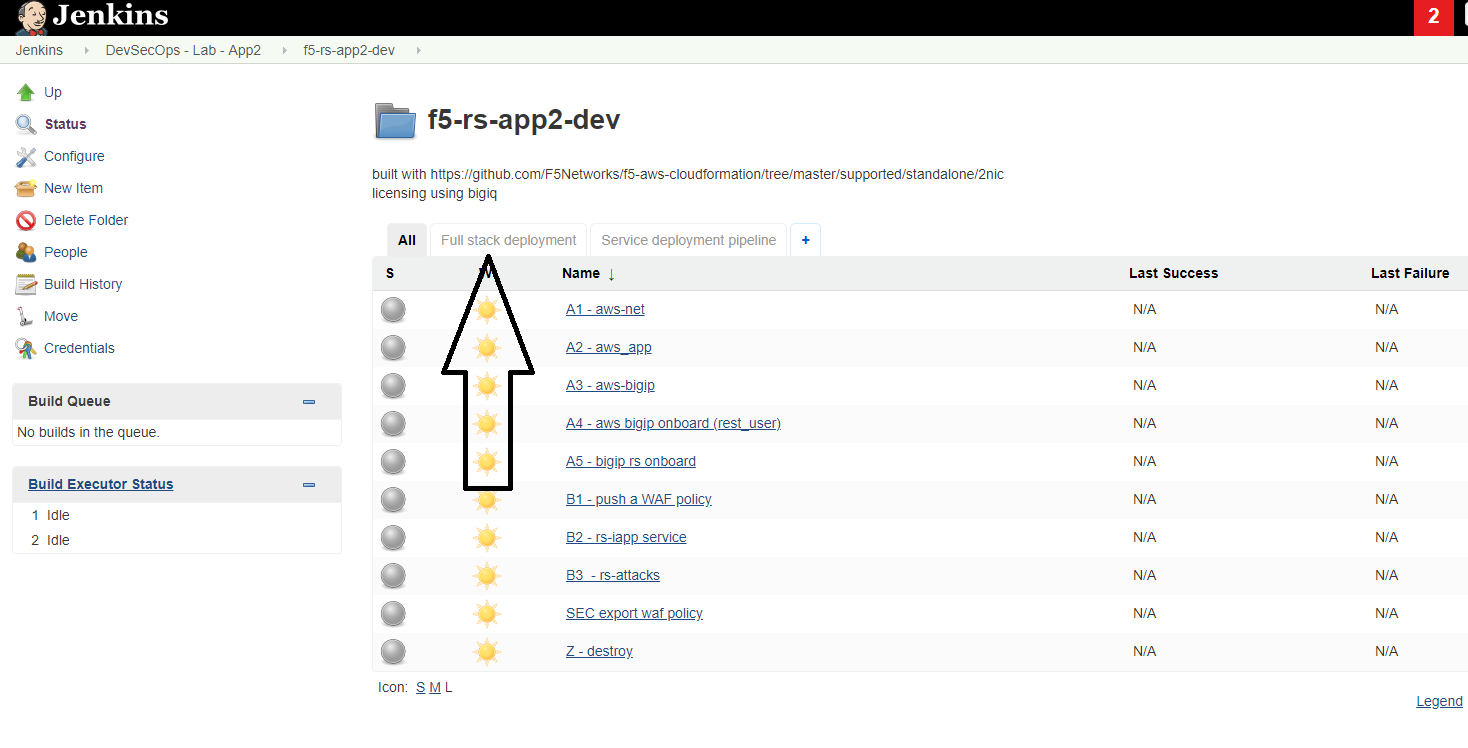
in jenkins open the DevSecOps - Lab - App2 folder, the lab jobs are all in this folder we will start by deploying a DEV environment, you will start a pipeline that creates a full environment in AWS.

click on the ‘f5-rs-app2-dev’ folder. here you can see all of the relevant jenkins jobs for the dev environment.

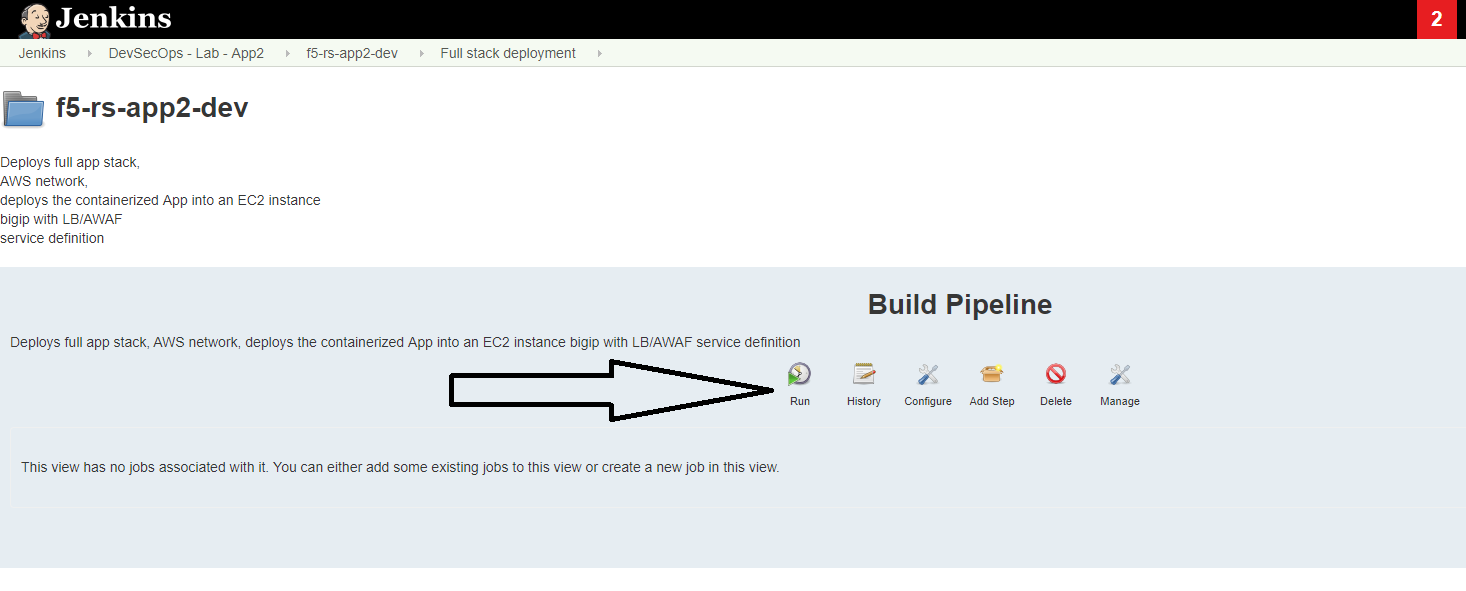
click on ‘Full stack deployment’ , that’s the pipeline view for the same folder.
click on ‘run’ to start the dev environment pipeline.
Task 1.3 - Review the deployed environment
Note
Jenkins doesn’t automatically refresh the page, either refresh manually to see the progress or click on the ‘ENABLE AUTO REFRESH’ on the upper right side.
1.3.1 review jobs output:
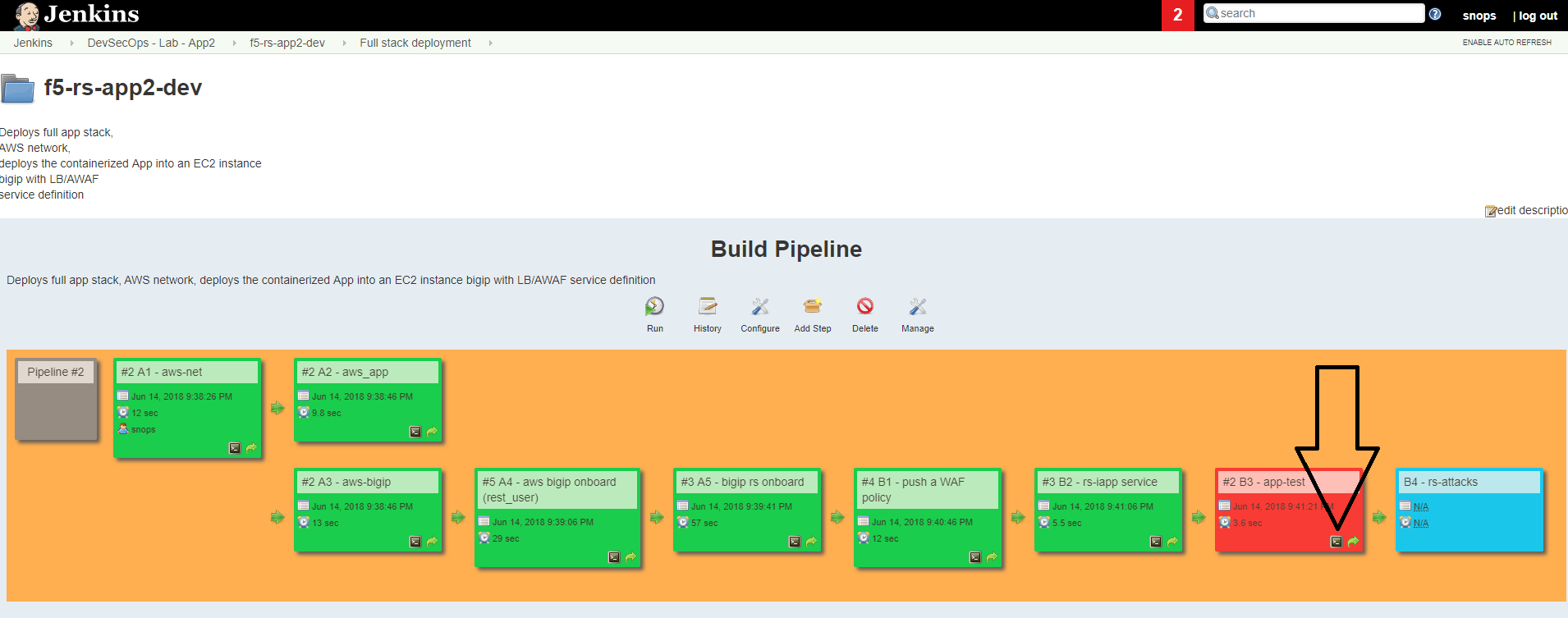
you can review the output of each job while its running, click on the small console output icon as shown in the screenshot:

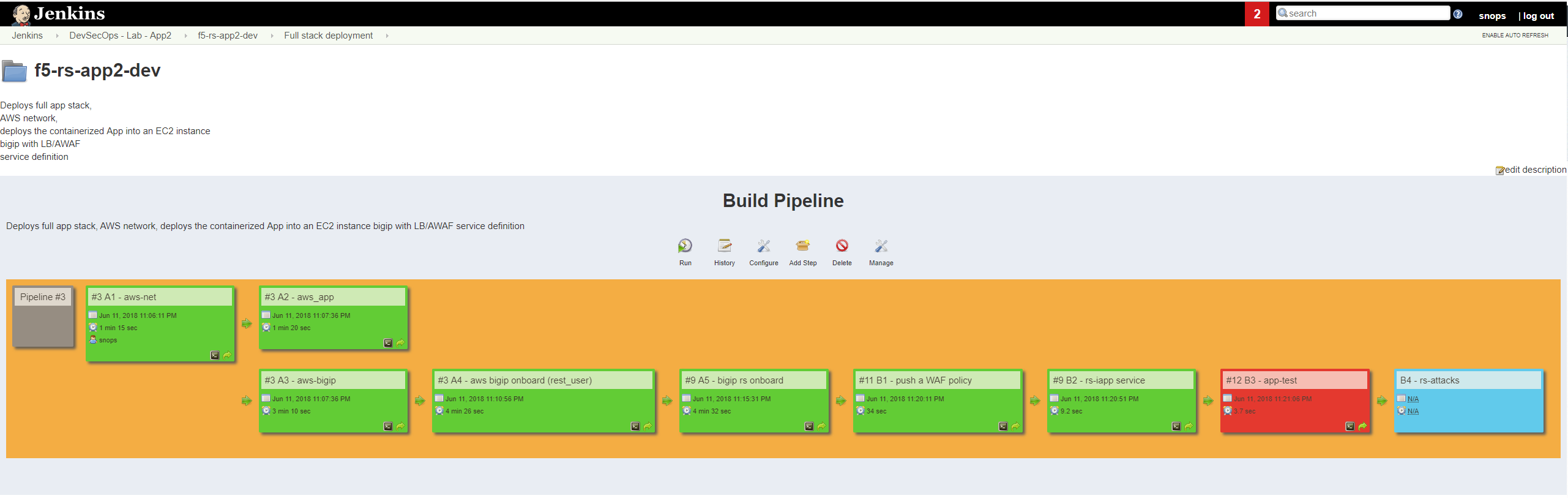
1.3.2 let the jobs run until the pipeline finishes:
wait until all of the jobs have finished (turned green and the app-test one is red ).
1.3.3 open slack and extract BIG-IP and application info:
open slack - https://f5-rs.slack.com/messages/C9WLUB89F/ (if you don’t already have an account you can set it up with an F5 email)
go to the builds channel.
use the search box on the upper right corner and filter by your username (student#). replace you student# in this string: “user: student# , solution: f5-rs-app2-dev, bigip acces:”
jenkins will send to this channel the BIG-IP and the application address.

1.3.4 login to the BIG-IP:
- use the address from task 1.3.3
- username: admin
- password: the personal password you defined in the global parameters file in the vault_dac_password parameter.
explore the objects that were created:
1.3.5 Access the App:
open slack - https://f5-rs.slack.com/messages/C9WLUB89F/ (if you don’t already have an account you can set it up with an F5 email)
go to the builds channel.
use the search box on the upper right corner and filter by your username (student#). replace you student# in this string: “user: student# , solution: f5-rs-app2-dev, application at:”
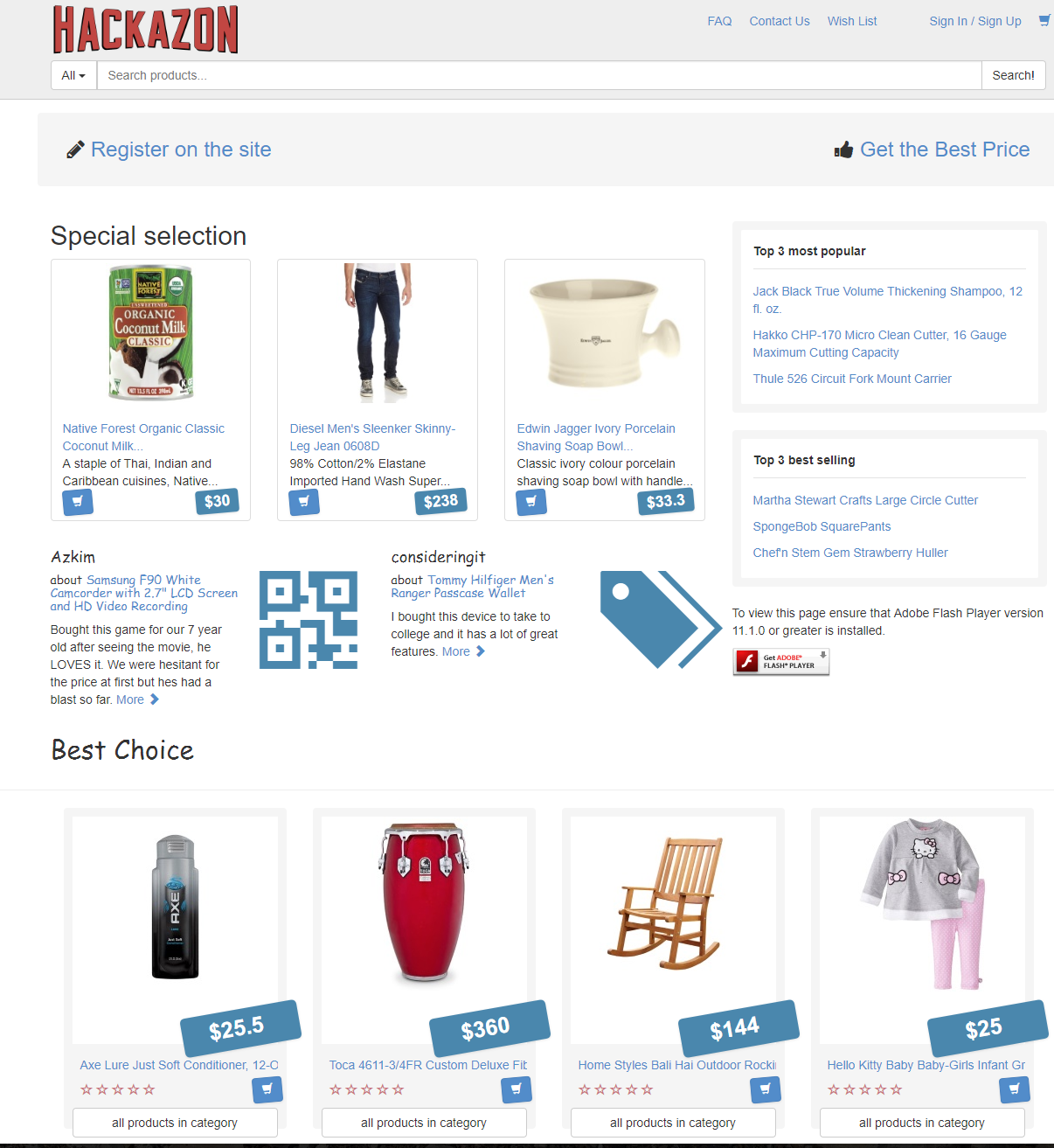
try to access the app using the ip provided in the slack channel - that’s the Elastic ip address that’s tied to the VIP on the BIG-IP.
after ignoring the ssl error (because the certificate isn’t valid for the domain) you should get to the Hackazone mainpage
1.3.6 Summary - Jobs roles:
A1 - aws-net:
- Builds an AWS VPC with subnets and security groups.
- Jenkins runs a shell command that kicks off an ansible playbook with parameters from the application repo. (like which region)
- Ansible playbook takes the parameters and use them to deploy a cloud formation template
- cloud formation template deploys all resources in AWS subscription
A2 - aws_app:
- Deploys an AWS autoscale group with a containerized app
- Jenkins runs a shell command that kicks off an ansible playbook with parameters from the application repo. (like container name)
- Jenkins uses the VPC / subnets information from previews job
- Ansible playbook takes the parameters and use them to deploy a cloud formation template
- cloud formation template deploys all resources in AWS subscription
A3 - aws-bigip:
- Deploys a BIG-IP to AWS
- Jenkins runs a shell command that kicks off an ansible playbook with parameters from the application repo. (like which region)
- Jenkins uses the VPC / subnets information from previews job
- Ansible playbook takes the parameters and use them to deploy a cloud formation template
- cloud formation template deploys all resources in AWS subscription
A4 - aws bigip onboard (rest_user):
- Connects to the BIG-IP over SSH with private key (only way to connect to an AWS instance).
- configures rest user and password for future use
A5 - bigip rs onboard:
- deploys the ‘enterprise’ default profiles, for example: HTTP, analytics, AVR, DOSL7, iapps etc.
- Jenkins runs a shell command that kicks off an ansible playbook with parameters from the application repo.
- Ansible playbook takes the parameters and uses them to deploy a configuration to the BIG-IP using the F5 supported ansible modules and API’s.
B1 - push a WAF policy:
- deploys the ‘application specific’ profiles, for example: DOSL7, waf policy
- Jenkins runs a shell command that kicks off an ansible playbook with parameters from the application repo. (which waf policy to use, dosl7 parameters)
- Ansible playbook takes the parameters and uses them to deploy a configuration to the BIG-IP using the F5 supported ansible modules and API’s.
B2 - rs-iapp service:
- deploys the ‘service definition’ uses AS2 API
- Jenkins runs a shell command that kicks off an ansible playbook with parameters from the application repo.
- Jenkins uses the application autoscale group name from previous jobs
- Ansible playbook takes the parameters and uses them to deploy a configuration to the BIG-IP using the F5 supported ansible modules and API’s.
- AS2 turns the service definition into objects on the BIG-IP
B3 - app-test:
- Send HTTP requests to the application to test it
- Jenkins runs a shell command that kicks off an ansible playbook with parameters
- Ansible playbook takes the parameters and uses them to run HTTP requests to our APP.
B4 - rs-attacks:
- Test app vulnerabilities
- Jenkins runs a shell command that kicks off an ansible playbook with parameters
- Ansible playbook takes the parameters and uses them to run HTTP requests to our APP.
SEC export waf policy:
- Pulls a policy from a BIG-IP and stores in a git repo
- Jenkins runs a shell command that kicks off an ansible playbook with parameters
- Ansible playbook takes the parameters and uses them to run F5 modules (Created by Fouad Chmainy <F.Chmainy@F5.com> ) to pull the waf policy from the BIG-IP
Z - destroy:
- Destroy the environment
Task 1.4 - Go over the test results
1.4.1 view the test results:
the deployment process failed because not all of the application tests completed successfully. review the app-test job console output
1.4.2 identify the WAF blocked page response:
scroll to the bottom of the page, you should see the response with request rejected, and the failure reason as unexpected response returned
this is an indication that ASM has blocked the request. in our case it is a false positive.

Note
in this lab secops uses the same WAF policy template for many apps. we don’t want to create a ‘snowflake’ waf policy. so with this failure dave will escalate to secops. that ensures that the setting will be reviewed and if needed the policy template will get updated. we don’t want to create a ‘snowflake’ waf policy. so with this failure Dave will escalate to secops. this ensures that the setting will be reviewed and if needed the policy template will get updated.